
प्रिय साधर्मी जैन बंधुवर माताओं एवं बहनों,
जैन समाज के कुछ सदस्यों के अथक प्रयास से भारत वर्षीय जैन समाज की आनलाइन डायरेक्टरी “www.jainhub.in” डोमेन के अन्तर्गत प्रकाशित की गयी है।
उक्त डायरेक्टरी में सभी जैन समाज के सदस्य अपने आप स्वयं को रजिस्टर कर सकते हैं, जो कि निशुल्क है।
अन रजिस्टर्ड व्यक्ति डायरेक्टरी में सिर्फ नाम, एवं उपनाम तक ही देख सकते हैं।
गोपनीयता नीति को ध्यान में रखते हुए इसे इस तरह डिजाइन किया गया है कि सिर्फ इसमें रजिस्ट्रेशन एवं सत्यापन के पश्चात ही सदस्यों को दूसरे सदस्यगण की जानकारी मिल सकेगी यानि कि नाम, उपनाम, पता (जितना आप लिखना चाहते हैं), शहर एवं मूल निवास।
मोबाइल नंबर एवं ईमेल किसी को नहीं दिखाई देंगे।
इससे अधिक जानकारी हेतु कोई भी रजिस्टर्ड एवं एप्रूव्ड सदस्य सिर्फ इसी एप्लीकेशन के द्वारा सम्बंधित सदस्य को आग्रह स्वयं के परिचय एवं संपर्क के साथ ईमेल संदेश (एक फार्म के द्वारा) भेज सकता है एवं सम्बद्ध व्यक्ति / सदस्य चाहे तो बाद में आपस में संपर्क कर अपनी जानकारी एक दूसरे को साझा कर सकते हैं।
हो सकता है कि रजिस्ट्रेशन एप्रूव होने में कुछ समय लग सकता है, क्यों कि यह एक व्यक्ति निर्भर मानवीय प्रक्रिया है जो कि समय की उपलब्धता से सुनिश्चित होगी।
यह जैन समाज की ऑनलाइन डायरेक्टरी है।
how to use application (वेब एप्लीकेशन का उपयोग कैसे करें ?) www.jainhub.in:
(वेब ब्राउज़र में जाकर टाइप करें ) www.jainhub.in आपको सबसे ऊपर लेफ्ट में ऐसा निशान दिखाई देगा।
On the top left of mobile screen, you will find icon like this
This is “Menu-icon” (यह मेनू आईकॉन है।) इस पर उंगली टच करें।
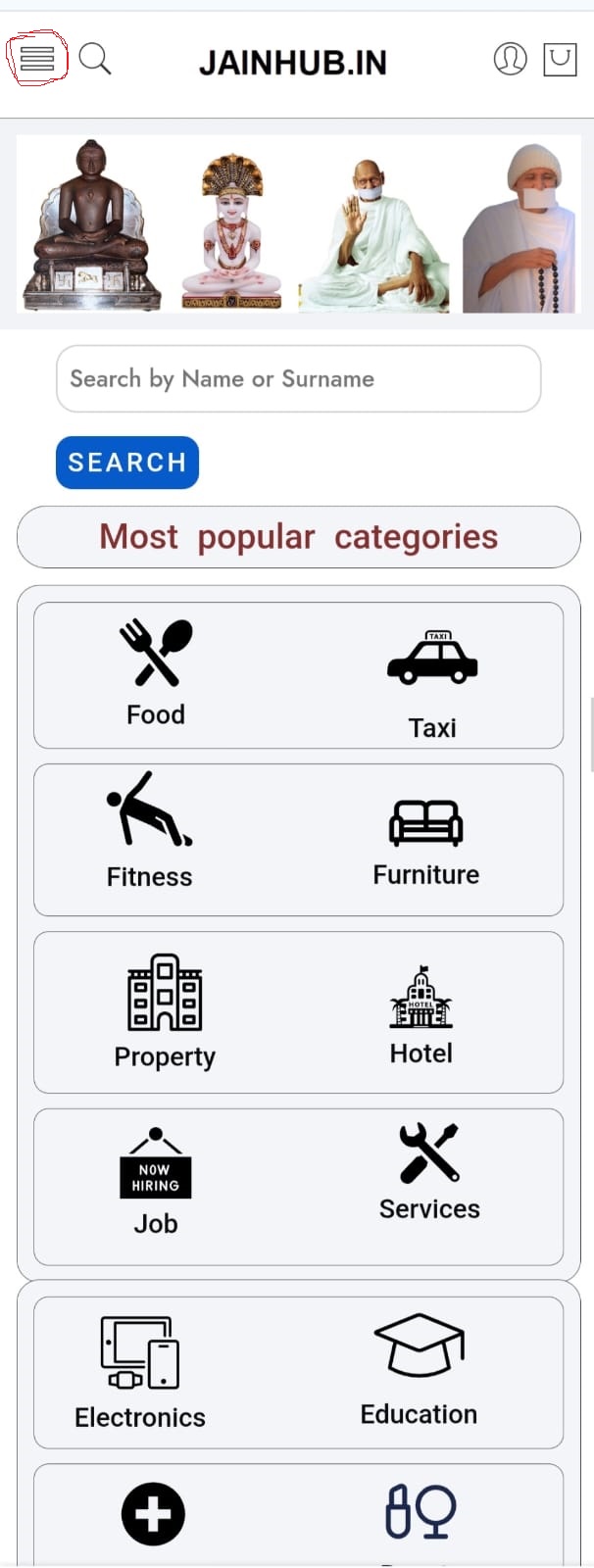
जो आधा पेज खुलेगा उस पर पहले बटन (Home) होगा।
दूसरा बटन होगा। DIRECTORY ठीक इसके सामने एक (+) का निशान होगा।
इस निशान पर उंगली टच करने से नीचे लिखे अनुसार तीन नए लिंक खुलेंगे।
All Members Listing (इस पर उंगली लगाने से सभी मेंबर्स की लिस्ट खुल जाएगी।)
Add Person Listing (इस पर उंगली लगाने से एक फॉर्म खुलेगा जिसके द्वारा आप अपनी लिस्टिंग जोड़ सकते हैं।)
Add Business Listing (यह लिंक सिर्फ उन लोगों के लिए हैं जो अपना प्रचार यहां पर करना चाहते हैं।)
इसके बाद आपको (ABOUT) लिखा हुआ मिलेगा। यहां क्लिक करने से आप हमारे बारे में जान पाएंगे।
इसके बाद आपको ( CONTACT ) लिखा हुआ मिलेगा। यहां क्लिक करने से आपको एक फार्म दिखाई देगा इस फॉर्म में अपना नाम, ईमेल, एवं मोबाइल फोन नंबर लिखकर अपना संदेश लिखकर हमें भेज सकते हैं।
इसके बाद आपको (PRODUCTS) का लिंक दिखाई देगा। इस पर क्लिक करने से प्रचार के लिए रखे गए सभी प्रोडक्ट्स दिखाई देंगे एवं प्रचार करने वाले का नाम पता दिखाई देगा l
सबसे भी नीचे वाली लाइन पर क्लिक करने से आप नीचे दिखाए गए चित्र के अनुसार लाग ईन एवं रजिस्टर पेज पर पहुंच जाएंगे।
LOGIN / REGISTER
यदि आप पहली बार इस एप्लीकेशन पर हैं तो आपको नीचे Login/Register वाली जगह पर क्लिक करना है।
क्लिक करते ही आप नीचे दिखाएं गए पेज पर आ जाएंगे।
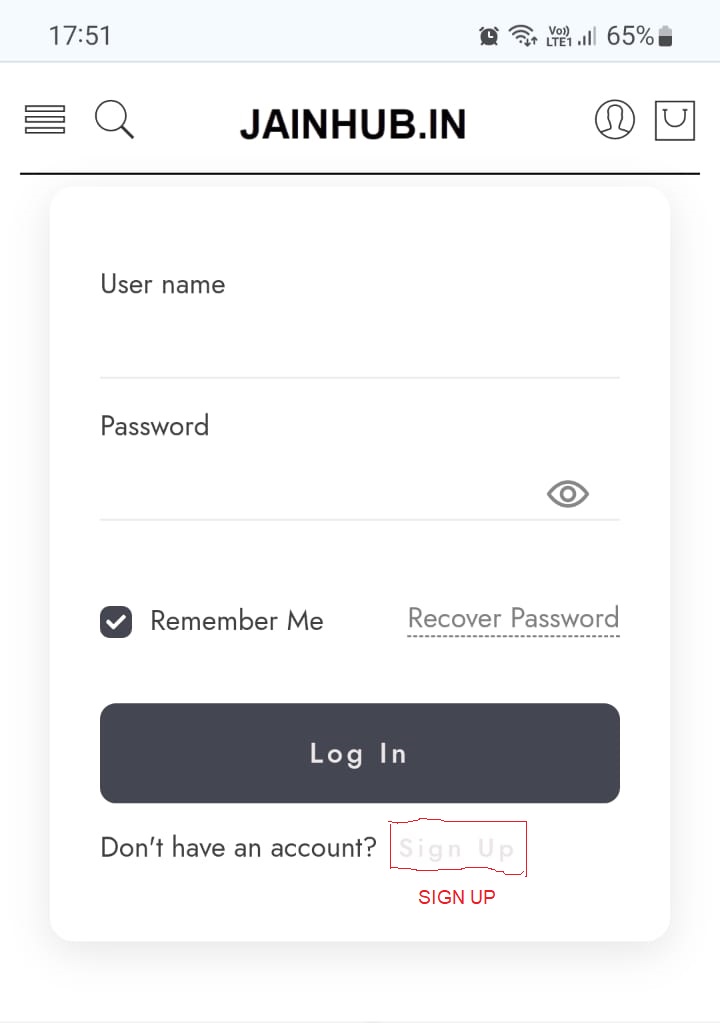
इस पेज में साइन-अप पर क्लिक करते ही नीचे दिखाए गए चित्र की तरह एक नया फॉर्म खुलेगा इसको आप पूरी तरह से भर के साइन अप ( SIGN UP) बटन पर क्लिक कर सकते हैं, जो भी जानकारी आप इस फॉर्म में भरेंगे उससे आपकी एक पहचान बन जाएगी हर बार वही डालने पर आप लॉगिन कर पाएंगे।

यह फॉर्म साइन-अप करने के बाद आप साइन-इन फॉर्म में फोन नंबर एवं पासवर्ड डाल कर वेब एप्लीकेशन पर पूरी तरह से सब कुछ देख सकते हैं, इससे पहले आपको अपने ईमेल पर प्राप्त लिंक क्लिक करना होगा ताकि आपका ईमेल वेरीफाई हो जाए। (only registered, verified and approved members can publish and view details)
1.Register yourself–> 2.verify your Email –> 3.Verify Your mobile number and native place on phone call–> How ?
सदस्यता फार्म कैसे भरें ? (Free)
- Open link “www.jainhub.in”
- Click on menu icon>You will find dropdown menu> Home / Directory / About / Contact / Products and Log-in / Register
- For Entry submission Click on LOGIN / REGISTER icon last one> You will find a form, click on Sign up as shown in image NO.1
4.Then Fill up registration form and submit (sign-up).
After submission you will receive an email for email conformation then This data will process for approval. This will take time because of identity confirmation.
- After verification You can sign-in and input entries in directory. Also view details of all registered members. Click on Add Member listing. Then Fill Form upload Photo and submit Few fields are mandatory rest are optional.
How to search directory. डायरेक्टरी में खोज कैसे करें ?
- Open link www.jainhub.in you will find a search window below top images. You can search here by name or surname.
- Click on menu icon> You will find dropdown menu> Home / Directory / About / Contact / Products
- For Directory search> Click on + icon opp. Directory> You will find three options> All members listing / Add person listing / Add Business listing
- On All members listing page You will see all listing with filter, Click on filter, you will find options as Surname/Present city /Native city– Type Surname, city or Native city and click on search button.
Your Desired result will display in few seconds. This result shows only Name, city, state and jain type (like; Digambar, Shwetambar, Sthanakvasi etc.)
If you want to contact other members or view more log in your account and go on desired member page and send him personalized message, he will respond you.
FAQ:
Q.1. Why product advertisement are here?
Ans. To meet Day to day and fix Expenditure of portal.
Q.2. Can any one view this directory ?
Ans. Only verified and login user can excess directory part.
Q.3. Product and services users can excess Directory?
Ans. No, Directory database and commercial user database are separate.
Q.4. Is it possible to find User’s Mobile Number or Email ID ?
Ans. It is not possible to find User’s Mobile Number or Email ID from this platform.
Q.5. What is benefit to join this platform if we can’t meet/find each other?
Ans. (A.)You can send message to any member through “contact form” on directory and send him Your contact number, address, WhatsApp Number and Email ID etc. then he will respond you, if he desire so.
(B) You will find information of Events specially “Jian samaj”
(C) You can Find Jain people near you through area wise search.
(D) New person in city or locality can find “Jain milan sthal.”
(E) After a large number of memberships we will plan local group feature on app.
Q.6. Is there any charges for subscription?
Ans. No,
Q.7. Is This website / Application can use through Mobile Phone ?
Ans. Yes, This Application is mobile friendly. You can install short cut on mobile, this will engage few (Less than 1/3 MB) space on your mobile.
Q.8. How to install this app on Mobile phone?
Case 1.
Open link “www.jainhub.in” on mobile, you will find a notification on bottom of mobile screen Add to home screen
Click on notification short cut of app will install and show on your phone.
Case 2.
If notification will not appear then you click on three dots on top right corner of screen and you will find add to home screen in drop-down, click it, within few seconds short cut appear on your mobile screen.